

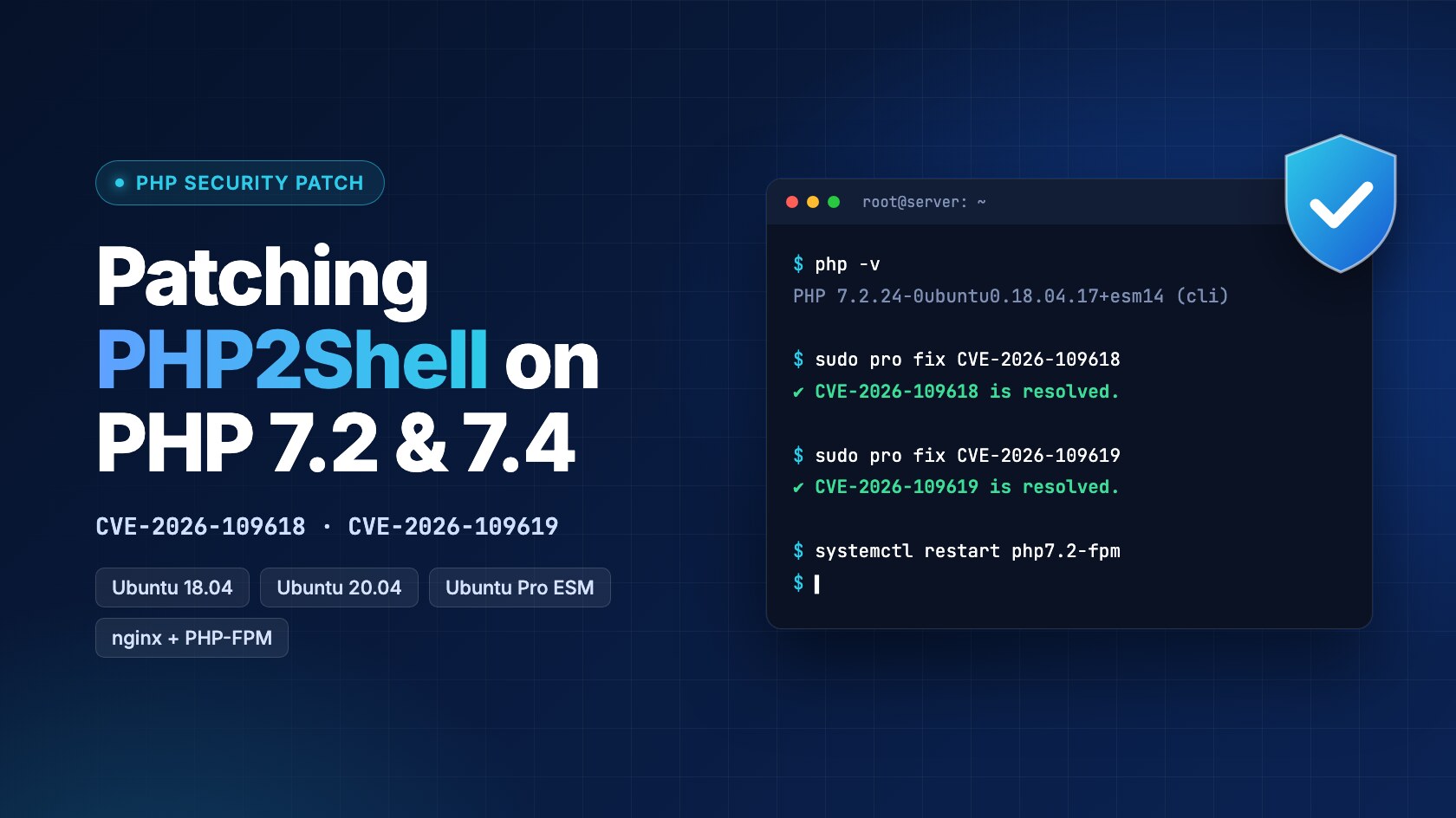
Short answer: PHP2Shell (CVE-2026-109618 and CVE-2026-109619) affects every PHP version back to 5.4, including PHP 7.2, and PHP will not release a fix for 7.2. On Ubuntu 18.04 the patched package is 7.2.24-0ubuntu0.18.04.17+esm14, and on Ubuntu 20.04 with PHP 7.4 it’s 7.4.3-4ubuntu2.29+esm5. Both come through Ubuntu Pro, and the Infra-only tier is enough. Until you can patch, turn off session.upload_progress, block multipart requests in nginx outside your upload routes, and restart PHP-FPM.
On 20 October, details of two critical PHP bugs leaked before anyone had a fix. PHP shipped emergency releases the next day, for 8.2 and newer. That didn’t help us much. Two of the applications we look after still run end-of-life PHP, one on 7.2 and one on 7.4, and neither branch gets packaged fixes from PHP anymore.
By 22 October both were patched: PHP 7.2 on an Ubuntu 18.04 box in an on-premises data centre, and PHP 7.4 on Ubuntu 20.04 servers on AWS. This is what we did, in roughly the order we did it.
What is PHP2Shell?
PHP2Shell is the nickname for two bugs in the PHP engine, CVE-2026-109618 and CVE-2026-109619. PHP rates both 9.2 out of 10. Neither needs a login, and both fire while PHP is still parsing the incoming request. Your framework hasn’t started at that point, so auth middleware and CSRF checks never get a say.
| CVE | What goes wrong | How it’s usually triggered |
| CVE-2026-109618 | PHP runs out of memory halfway through setting up a request, and the cleanup trusts data that was never finished | File uploads (multipart requests) |
| CVE-2026-109619 | Leftover state from one request gets reused by the next request on the same worker | Session upload progress, or PHP settings passed in from the web server |
Upstream fixes landed in 8.5.12, 8.4.27, 8.3.36 and 8.2.35. Versions 7.4 to 8.1 got source-only patches, and 5.4 to 7.3 got nothing (Tenable’s FAQ has the full table). So if you’re on 7.2, the only patched builds out there are the ones Linux distributions backport for their extended-support customers.
How to Tell if Your PHP Server Is Exposed
Before changing anything I wanted answers to four questions, because each answer changes what the fix looks like.
1. Where does PHP come from? php -v plus apt-cache policy php7.2-common showed Ubuntu’s own packages, not the ondrej PPA. That was good news. Distro packages get distro backports, and PPA builds don’t.
2. How is PHP connected to the web server? nginx and PHP-FPM. Apache with mod_php is the worst case for this bug, so that was a relief.
3. What’s in front of it? On the in-house server, a network firewall and nothing that looks inside HTTP requests.
4. Which pages accept file uploads? A grep through the Blade views for multipart and FormData turned up exactly one, an admin settings form.
That last grep took a few minutes and ended up shaping the whole mitigation. With only one upload route, we could block multipart requests everywhere else without worrying about breaking the payment flow.
How to Mitigate PHP2Shell Before You Can Patch
Getting a patched build was going to take a few hours at best: a purchase, a licence, a change window. Exploit attempts were already being reported, so we put two server-side controls in first.
1. A PHP config drop-in
It has to be set at server level. ini_set() and .user.ini won’t protect you, because the bug fires before your code runs.
; /etc/php/7.2/fpm/conf.d/99-php2shell.ini
session.upload_progress.enabled = 0
memory_limit = -1
post_max_size = 8M
upload_max_filesize = 2M
memory_limit = -1 is PHP’s own suggested stopgap for CVE-2026-109618. It’s only sensible with plenty of free RAM or a cgroup limit behind it, and you should put the old value back once you’re patched. Restart PHP-FPM after the change rather than reloading it, so no old worker hangs around.
2. An nginx rule that blocks multipart requests
It returns 403 for any multipart request, except on the one route that needs uploads:
set $block_mp 0;
if ($http_content_type ~* "multipart") { set $block_mp 1; }
if ($uri = /your-upload-route) { set $block_mp 0; }
if ($block_mp) { return 403; }
A quick curl -F a=b against the login page came back 403, and a normal GET still returned 200. While we were in the nginx config we also made sure nothing passed PHP_VALUE through fastcgi_param, which is another way to trigger CVE-2026-109619.
If you’re behind a WAF, good, but don’t stop there. Vendor rules match exploits they’ve already seen, new variants show up within days, and none of it matters if someone can reach your origin IP directly.
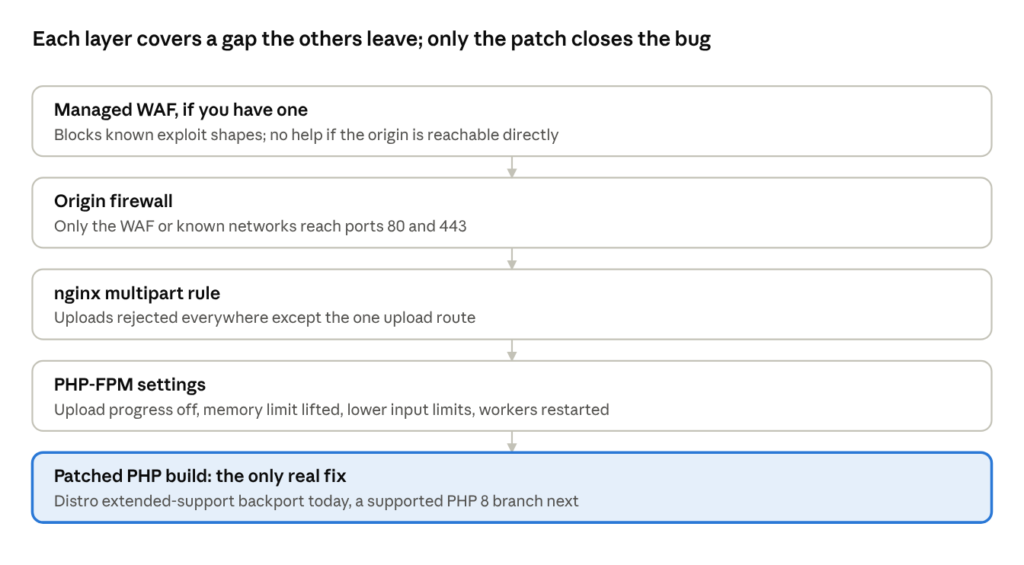
None of these layers is enough on its own, and only the last one actually removes the bug.
How to Patch PHP 7.2 on Ubuntu 18.04 with Ubuntu Pro
Ubuntu does ship a fixed PHP 7.2 for 18.04, version 7.2.24-0ubuntu0.18.04.17+esm14, but only through Ubuntu Pro’s Expanded Security Maintenance (Ubuntu’s CVE page). 18.04 is out of standard support, so a plain install never sees it.
We bought the Infra-only tier for one physical server, with no support and no Legacy add-on. Infra-only covers Ubuntu’s main repository, and php7.2 lives in main on bionic, which is worth confirming on Launchpad rather than assuming. Bionic stays in ESM until 2028, so Legacy wasn’t needed. One thing to check before you buy: run systemd-detect-virt. If it says anything other than none, you’re on a VM and the licence goes against the physical host.
The steps, roughly as we ran them
Step 1: Back up /etc and note the installed PHP package versions.
Step 2: Install the client with sudo apt install ubuntu-advantage-tools. If pro still isn’t found afterwards, hash -r fixes it.
Step 3: Run sudo pro attach <token>, then sudo pro enable esm-infra.
Step 4: Dry-run the upgrade with apt-get install -s --only-upgrade php7.2-* and check that only PHP packages move, to the +esm version.
Step 5: Upgrade just the PHP packages, keeping local config files if apt asks.
Step 6: Run sudo systemctl restart php7.2-fpm, so no worker keeps the old code in memory.
Step 7: Check dpkg -l, php -v, and pro fix CVE-2026-109618 / CVE-2026-109619.
Step 8: Click through login, creating a payment link, a real payment, the exports and the upload form.
We left the rest of the pending updates alone that day, and there were a lot of them, including a kernel too old for Livepatch. Those need a reboot and a proper maintenance window. do-release-upgrade was off the table entirely, since it would swap PHP 7.2 for 7.4 and break the app.
One snag to plan for: pro attach just hangs if the server can’t reach contracts.canonical.com and esm.ubuntu.com on port 443. On a locked-down network, ask for those before you start.
How to Patch PHP 7.4 on Ubuntu 20.04 (AWS)
The AWS servers ran Ubuntu 20.04 with PHP 7.4, which is a slightly better place to be. PHP did publish source patches for 7.4, but there’s no packaged release from php.net. Ubuntu 20.04 left standard support in 2025, so Canonical’s fixed build, 7.4.3-4ubuntu2.29+esm5, again only comes through Ubuntu Pro’s ESM (Ubuntu’s CVE page). php7.4 is in main on focal (Launchpad), so esm-infra covers it, same as on 18.04.
The steps matched the in-house server with the version numbers swapped: attach Pro, enable esm-infra, dry-run, upgrade only the php7.4-* packages, restart php7.4-fpm, and check pro fix. The stopgap settings went into /etc/php/7.4/fpm/conf.d/ instead.
On EC2 you can either attach a token bought from Canonical, exactly as on-prem, or pay for Ubuntu Pro through AWS, which only applies to EC2 instances. The patched package is the same either way. Locking down the origin was quicker too: a few security group rules instead of a firewall change request to another team.
Do other Linux distributions have a PHP2Shell patch for old PHP?
Mostly yes, but almost always through a paid extended-support channel, not the free repositories. This is where things stood on 23 October 2026. Check your distribution’s tracker before relying on it, because these pages were still changing.
| Distribution | Old PHP covered | Fixed package | How you get it |
|---|---|---|---|
| Ubuntu 14.04, 16.04 | php5, php7.0 | 7.0.33-0ubuntu0.16.04.16+esm22 on 16.04 |
Ubuntu Pro with the Legacy add-on (tracker) |
| Ubuntu 18.04, 20.04 | php7.2, php7.4 | +esm14 and +esm5 builds above |
Ubuntu Pro, Infra-only is enough |
| Debian 11 bullseye | php7.4 | 7.4.33-1+deb11u14 |
Freexian ELTS, paid (ELA-1853-1) |
| Debian 10 buster | php7.3 | 7.3.31-1~deb10u16 |
Freexian ELTS, paid (ELA-1854-1) |
| RHEL 8 | php:7.4 stream | Red Hat update, per AlmaLinux | RHEL subscription. The 7.2 and 7.3 streams had no Red Hat fix when AlmaLinux published |
| AlmaLinux 8 | php:7.2, 7.3, 7.4 streams | php-7.2.24-1...alma.1, php-7.3.20-1...alma.1, php-7.4.33-8 |
Free, regular repositories (AlmaLinux) |
| SLES 15 SP4 to SP7, SLES 12 SP5 | php7 / php74 (7.4) | 7.4.33-150400.4.81.1, 7.4.33-1.74.1 |
SP7, or LTSS on older service packs (SUSE) |
| openSUSE Leap 15.x | php7 | Not fixed yet | Watch the SUSE tracker |
| CloudLinux 7, 8, 9 (cPanel) | alt-php and ea-php 5.2 to 8.5 | e.g. ea-php72 7.2.34-12, ea-php74 7.4.33-18 |
Free, stable repositories (CloudLinux) |
| Most of the above, plus Windows | PHP 5.2 to 8.5 | Vendor backports | TuxCare ELS for PHP, from $5,000 a year for up to 10 licences (TuxCare) |
Two patterns stand out. Debian’s free security tracker has no fix at all for bullseye or buster, because both are past regular LTS. On the RHEL side, AlmaLinux patched the 7.2 and 7.3 streams on its own, without waiting for Red Hat, which makes it the easiest free option for an old EL8 box.
How to Check Whether PHP2Shell Was Exploited on Your Server
A patch won’t evict someone who’s already in. The details had been public since 20 October, so we went through the in-house server before patching it.
| Check | Command | What would worry us |
| Web user processes | ps -ef | grep '^<php-user>' | grep -vE 'php-fpm|nginx' |
Shells, curl, wget, binaries nobody recognises |
| New files | find /var/www /tmp /dev/shm -newermt <leak date> -type f \( -name '*.php' -o -perm -u+x \) |
New .php files or executables outside vendor |
| FPM crashes | grep -E 'signal (11|6)' /var/log/php7.2-fpm.log* |
Segfaults since the leak |
| Failed uploads | POSTs returning 5xx in the nginx logs | Bursts on routes that never take uploads |
| Persistence | crontab -l -u <php-user>, /etc/cron.d |
Entries nobody remembers adding |
| Outbound traffic | ss -tnp |
Connections to unknown hosts, including on 443 |
One gotcha: find out which user PHP-FPM actually runs as before you trust any of this. Our process list had no www-data processes at all, so the workers were running under some other account and our first check had been looking at the wrong user. Whatever that account is, a PHP exploit gets its permissions. If it’s an admin account, a web bug becomes a full server compromise.
After the upgrade we confirmed three things: every php7.2-* package showed the +esm version, pro fix reported both CVEs as resolved, and PHP-FPM had started after the upgrade, not before it.
Lessons Learned and a PHP2Shell Checklist
The patch itself was quick. Most of the work was everything around it.
End-of-life PHP isn’t a backlog item for us anymore. Every engine bug from here on lands on it with no upstream fix. The extended-support build bought us time and nothing more. The real fix is the move to a supported PHP 8 release.
Knowing exactly which routes take uploads is what made the nginx block safe to ship in a hurry. We’ll keep that list up to date from now on.
And keep the emergency patch separate from the backlog. Upgrade the affected packages today, then give the kernel, the reboot and the hundreds of other pending updates their own window.
The short version, for next time
- Inventory: Write down the PHP version, package source and server API for every server.
- Upload routes: List the routes that accept uploads.
- PHP settings: Apply the server-level PHP settings and restart PHP-FPM.
- Web server rule: Block multipart requests outside the upload routes.
- Compromise checks: Run them as the real PHP-FPM user.
- Patch: Upgrade only the affected packages, then restart PHP-FPM.
- Verify: Confirm the version, the
pro fixstatus and the process start time. - Smoke test: Click through the journeys that matter most.
- Follow-up: Book the remaining OS updates and the reboot.
PHP2Shell FAQ
Is PHP 7.2 affected by PHP2Shell?
Yes. The vulnerable code goes back to PHP 5.4, so 7.2 is affected. PHP itself won’t release a fix for 7.3 or older. Your only patched option is a backported build from your Linux distribution’s extended-support programme.
Which PHP versions fix CVE-2026-109618 and CVE-2026-109619?
PHP 8.5.12, 8.4.27, 8.3.36 and 8.2.35. Versions 7.4 to 8.1 have source-only patches from the PHP security team. Distribution packages may carry their own fixed version numbers, so check your distro’s security tracker.
Is there a PHP2Shell patch for Ubuntu 18.04?
Yes. Canonical lists php7.2 on 18.04 (bionic) as fixed in 7.2.24-0ubuntu0.18.04.17+esm14. It comes through Expanded Security Maintenance, so you need an Ubuntu Pro subscription attached to the server.
Is there a PHP2Shell patch for PHP 7.4 on Ubuntu 20.04?
Yes. Canonical lists php7.4 on 20.04 (focal) as fixed in 7.4.3-4ubuntu2.29+esm5. Ubuntu 20.04 is past standard support, so the fix also comes through Ubuntu Pro’s ESM, and esm-infra covers it because php7.4 is in main.
Does Ubuntu Pro Infra-only cover the PHP 7.2 fix?
Yes. Infra-only covers Ubuntu’s main repository, and the php7.2 source package is in main on 18.04. After pro attach, enabling esm-infra is enough. You don’t need esm-apps.
Does a WAF protect against PHP2Shell?
Partly. WAF rules block known exploit patterns, but new variants appear quickly, and a WAF does nothing if attackers can reach your server’s IP directly. Use it alongside server-level mitigations and the patch, never instead of them.
Does turning off file_uploads stop PHP2Shell?
No. Published mitigation guidance lists file_uploads = Off as ineffective. Block multipart requests at the web server instead, disable session.upload_progress, and set the options in php.ini or the PHP-FPM pool, not with ini_set().
Is nginx with PHP-FPM vulnerable?
Yes. PHP-FPM is on the affected list, along with Apache mod_php, php-cgi, FrankenPHP and LiteSpeed. mod_php carries the highest risk, but nginx with PHP-FPM still needs the patch and the interim settings.